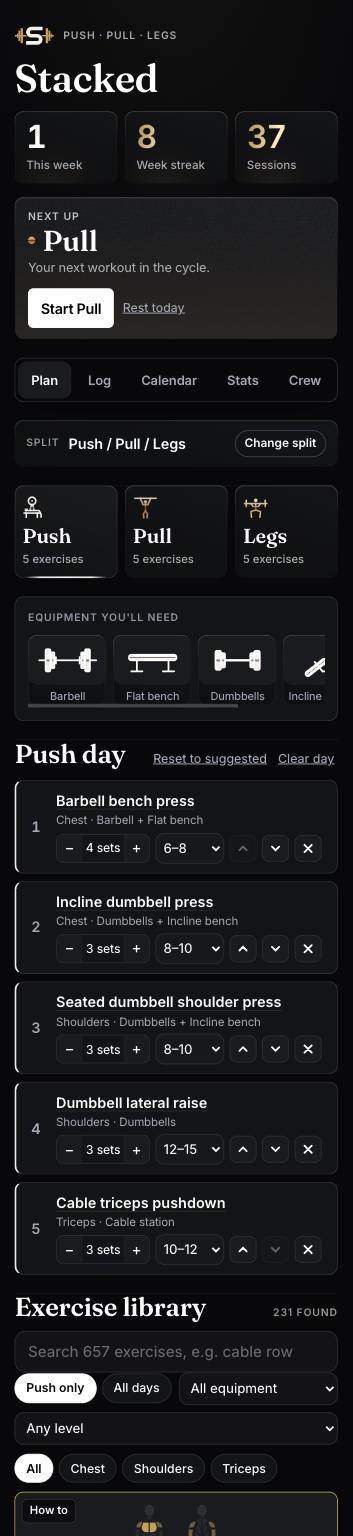
The gym tracker that keeps your crew lifting
Pick your split, log every set and watch the weights climb. Free, on your phone, and with a leaderboard for you and your mates.
Every popular split, ready on day one
Most training plans fall apart at the logbook
Notes apps get messy and spreadsheets don't come to the gym. Stacked keeps your plan, your sets and your progress in one place, so every session starts from what you lifted last time.
Pick a split.
Or build your own.
Three proven splits ready to go, or create your own and name every day.
See how it worksMuscle maps
Every exercise shows the muscles it works, so you know you've covered the whole body.
Add your own moves
Gym has a machine that isn't on the list? Add it in seconds.
Ready-made exercise list
Start from a list of common lifts sorted by day, instead of a blank page.
Built for your phone
Big buttons and quick taps between sets. No laptop needed.
Every set.
Every kilo.
Log weight and reps as you go and tick each set off. Stacked shows what you did last session, so you always know the number to beat.
Calendar in day colours
Push in white, Pull in bronze, Legs in gold. See your week at a glance and spot the gaps.
Streaks that stick
Every session keeps your streak alive. Miss one and you'll feel it on the leaderboard.
PRs flagged for you
Lift more than ever before and Stacked marks it as a personal record automatically.
Train together,
even on different days
Join with your name and a crew code. See each other's sessions and race for the top spot on streaks and PRs.
Join with a code
Your crew shares one short code. Type it in with your name and you're in.
Profile photos
Put a face to the name at the top of the board.
See what everyone lifted
Check your mates' sessions, weights and PRs as they log them, then go and beat them.
Your data stays on your phone
Your workouts are saved on your own device. Only what you choose to share with your crew leaves it. No account, no email, no ads.
Set up in two minutes,
from your phone
No app store, no sign-up form. Open the link, add it to your home screen and start lifting.
- Open Stacked
Go to stacked-crew.netlify.app in Safari on iPhone or Chrome on Android.
- Add to home screen
It then opens full screen like any other app. Steps are just below.
- Pick your split
On the Plan tab, choose Push/Pull/Legs, Upper/Lower, Anterior/Posterior/Legs, or make your own.
- Choose exercises
Tap a day and add exercises from the list. Add your own if one's missing.
- Log your sets
Enter weight and reps and tick each set off. Finished workouts land on your calendar.
- Join your crew
On the Crew tab, enter your name and crew code. Add a photo and you're on the board.
No app store. No download wait.
Stacked runs in your phone's browser and installs to your home screen in a few taps. Works on iPhone, Android and desktop.
Open Stacked
Bookmark it, or send the link to your crew.
iPhone
- Open the link in Safari
- Tap the Share button
- Tap Add to Home Screen, then Add
Android
- Open the link in Chrome
- Tap the ⋮ menu
- Tap Install app or Add to Home screen
Desktop
- Open the link in Chrome or Edge
- Click the install icon in the address bar
Every Stacked Core feature is free: all splits, muscle maps, set logging, calendar, streaks and the crew leaderboard.
Are you a personal trainer?
Stacked Pro gives every client the app and gives you one dashboard to coach them all.
Good to know
Is Stacked Core really free?
Yes. Every feature for lifters and their mates is free, with no ads.
Do I need to download it from the App Store?
No. Open the link and add it to your home screen. It opens full screen and works like a normal app.
Where is my workout data saved?
On your own phone. If you join a crew, the workouts, streaks and PRs you share are visible to that crew.
What's a crew code?
A short code your group shares. Enter it with your name on the Crew tab and you'll see each other's workouts and the leaderboard.
Can I use it without a crew?
Yes. Everything except the leaderboard works on your own.
Your next PR starts with the first set you log
Open Stacked, pick your split and bring your crew along.